DocsBilling & FAQ
Affiliate program
Share your link and earn credits on what your referrals buy — or apply to become an affiliate and earn cash, with tiers, your own links and codes.
Every VidNext account with credits on its balance has a referral link. Share it and you earn 10% in credits of what your referrals buy in their first year — as credits, with nothing to set up. That is the referral level, and it is where everyone starts.
Affiliates are referrers who applied and were approved. They are paid in cash (US dollars, through the payout method they choose on the Payouts tab) or credits — their choice per claim, with a 50% bonus when they take credits — start on a tier ladder that raises their pool from 10% to 15% by itself — with Ambassador, the top tier, above it — and get their own links, promo codes and customer discounts.
Where to find it
Everything lives on the Affiliate program page in your account (the person menu → Affiliate program). See what you could earn on that page opens the earnings calculator; the public affiliate page tells visitors the same story before they sign up.
Your link and code
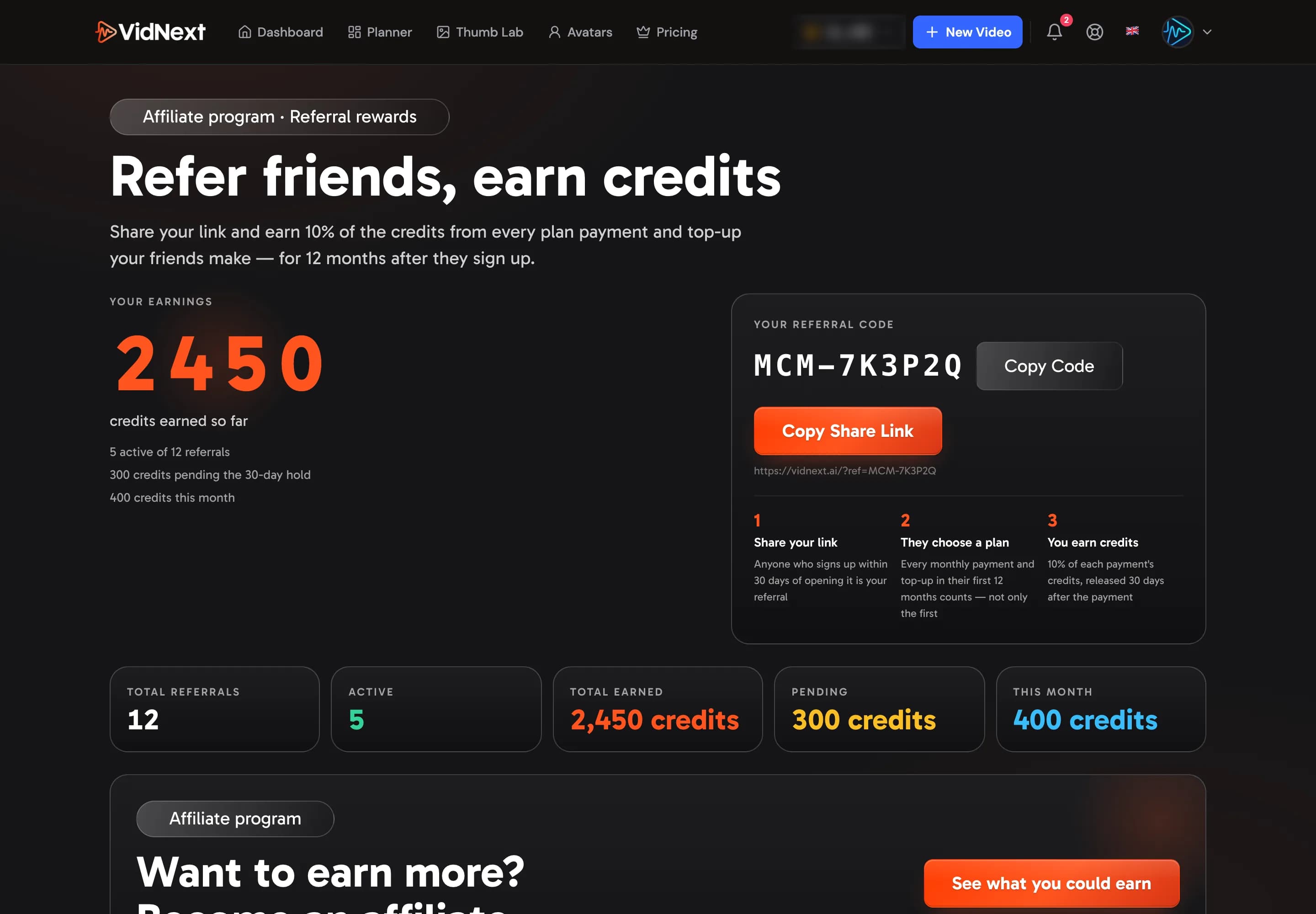
The page shows your referral code Show me in the app ↗ with Copy Code Show me in the app ↗ and Copy Share Link Show me in the app ↗, the credits you have earned so far, and the numbers under it Show me in the app ↗: referrals, active referrals, credits earned, pending and this month. Below, the referrals table lists everyone who came through your link and what each of them brought.
- Share your link. It opens the VidNext homepage with your code attached; anyone who signs up within 30 days of opening it is your referral (if they open several people's links, the last one counts).
- They buy. Every plan payment and top-up in their first 12 months counts, not only the first.
- You earn credits. 10% of the credits each purchase buys — a month of their plan, a top-up, or for a yearly plan the whole year's credits at once — released 30 days after the purchase, the refund window. Until then the reward shows as Pending.
Your link unlocks as soon as your balance has credits — from a plan, a top-up, a gift or referral earnings.
Becoming an affiliate
Under the numbers sits the Become an affiliate card Show me in the app ↗. It lists what approval brings — cash payouts, a growing pool, your own links and codes — and has two buttons: See what you could earn Show me in the app ↗ opens the calculator page, Apply now Show me in the app ↗ opens the three-step application.
If your last 90 days already clear a tier's bar (for example $150 in net revenue or 3 new paying customers for Partner), the card says so: apply, and you start on that tier the moment you are approved.
- Pending. After you apply, the card shows Application received and what you sent us Show me in the app ↗. A person reviews it, usually within a few business days, and you get an email either way. You keep earning credits meanwhile.
- Declined. The card shows the reason. Fix what is listed and apply again whenever you like — your credits keep coming.
- Applications closed. Sometimes we pause new applications; the card says so, your link keeps earning credits, and the calculator page still shows how the program works.
Referrers never move up the tiers on their own: tiers, cash and the toolkit start with approval.
Estimate your earnings
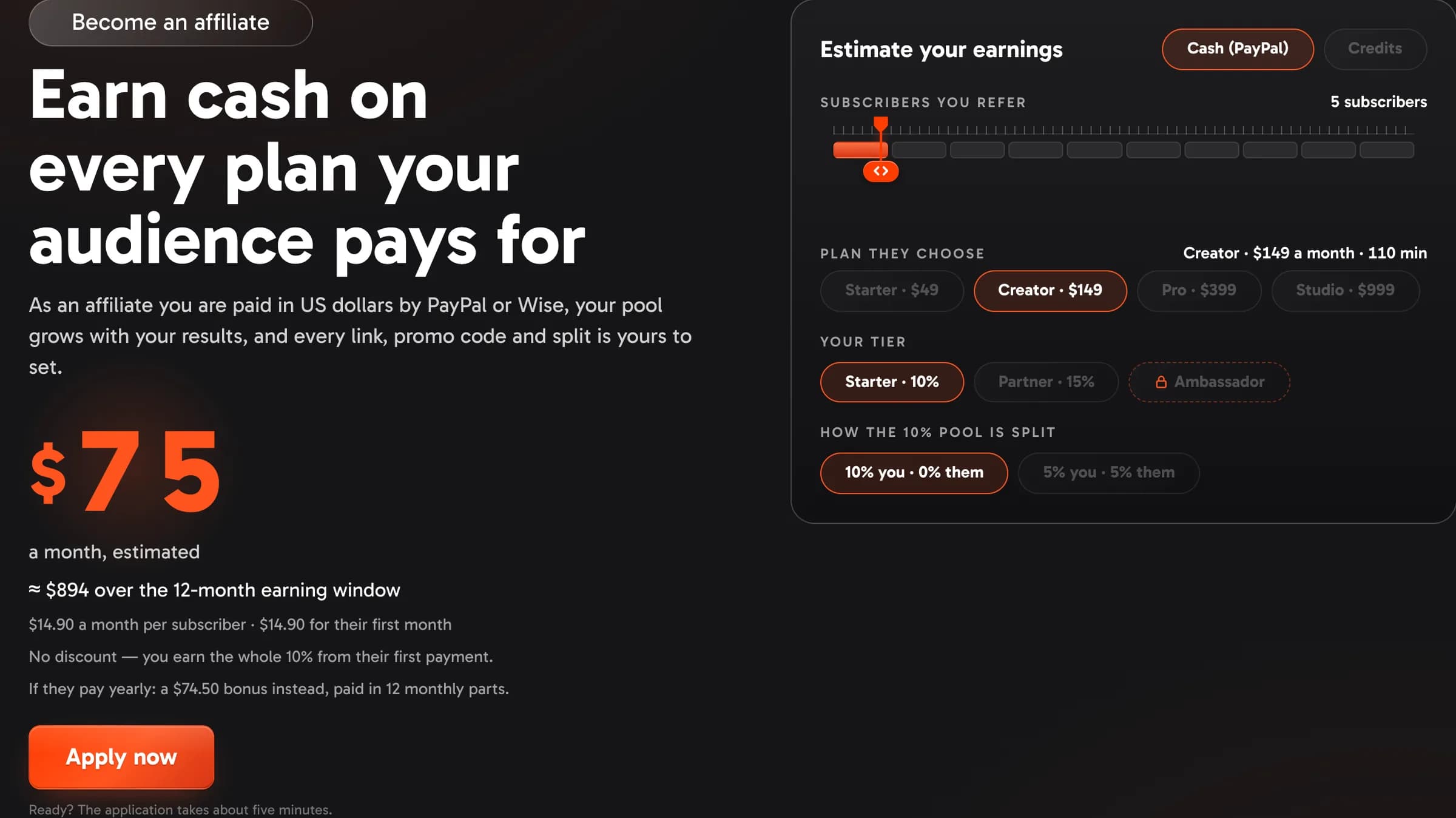
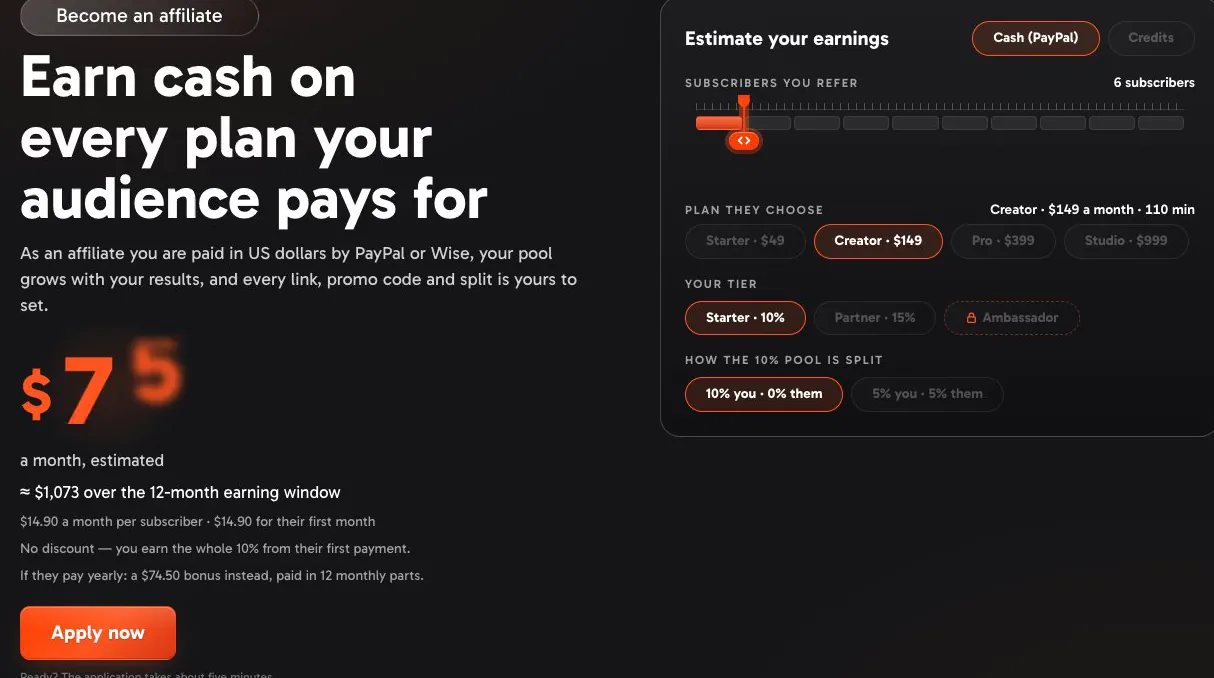
See what you could earn opens a page with the earnings calculator: set the subscribers you expect to bring Show me in the app ↗, the plan they choose Show me in the app ↗, the tier Show me in the app ↗ (a padlock marks a tier that is by invitation — click it to see why) and the split of that tier's pool Show me in the app ↗, and switch between cash and credits Show me in the app ↗. The big number Show me in the app ↗ is an illustrative estimate from today's plan prices and your inputs — not a forecast or a promise. Under it: what one subscriber brings in their first month and in every month after, the $399 cap on bigger plans, and the bonus a yearly plan pays instead. Below it: the three tiers Show me in the app ↗, how it works, the facts and the FAQ Show me in the app ↗. Apply now sits under the estimate Show me in the app ↗ and in the bar at the bottom of the page Show me in the app ↗; Back to your referral page Show me in the app ↗ takes you home.
Approved affiliates reach the same page from Estimate your earnings on the Program tab Show me in the app ↗; the calculator opens on their own tier and split, with no Apply button.
The application: three steps
- About you Show me in the app ↗ — your legal name Show me in the app ↗, as on your tax form and payout account, and whether you apply as an individual or a company Show me in the app ↗ (a company also gives its name Show me in the app ↗).
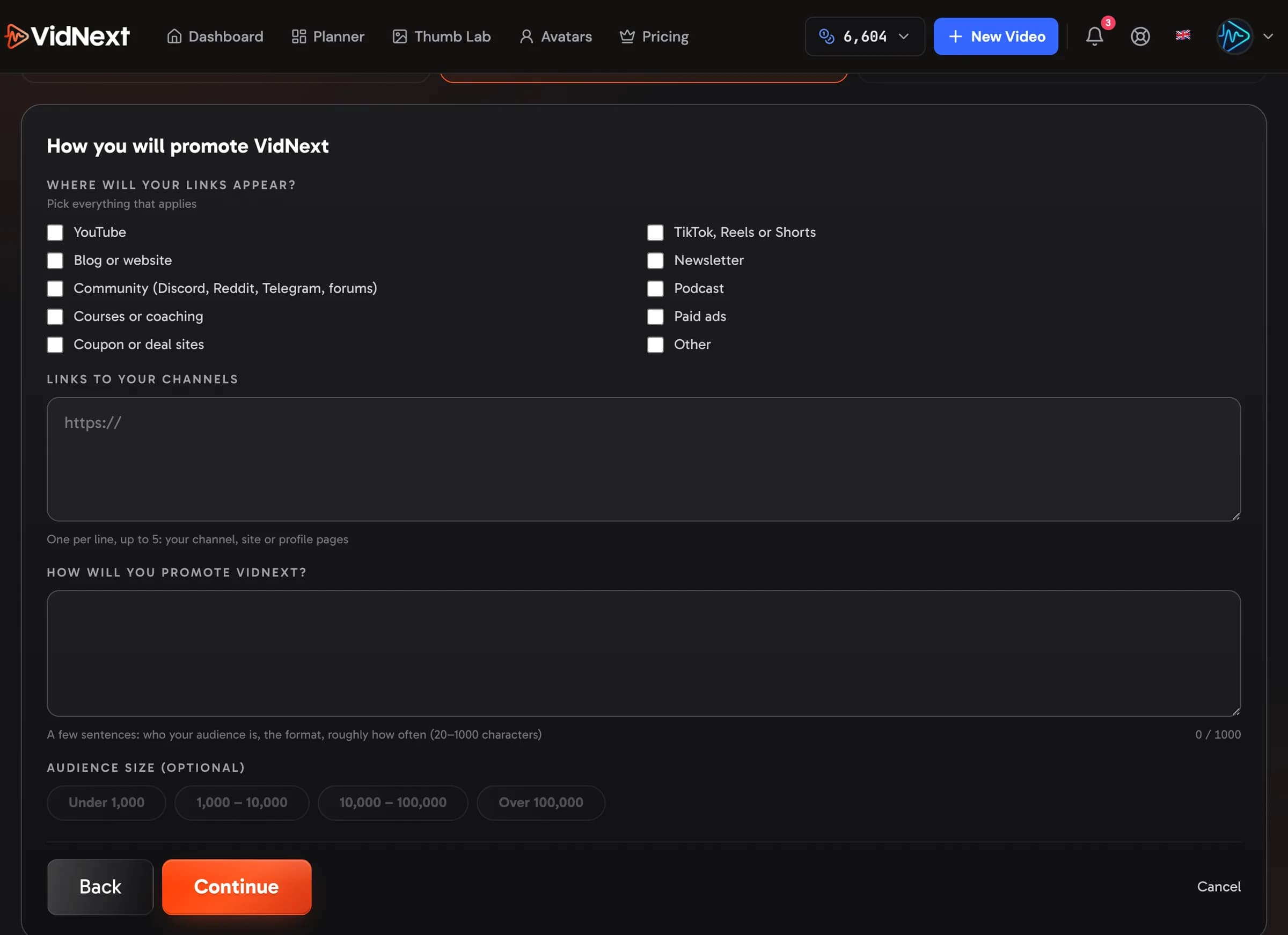
- How you will promote VidNext Show me in the app ↗ — the channels where your links will appear Show me in the app ↗ (YouTube, short video, a blog or website, a newsletter, communities, a podcast, courses, paid ads, coupon or deal sites), one to five links to those channels Show me in the app ↗, a few sentences on your plan Show me in the app ↗ and, if you like, your audience size Show me in the app ↗. Paid ads are fine as long as you never bid on "VidNext"; coupon and deal sites need our written approval, so name them in your plan.
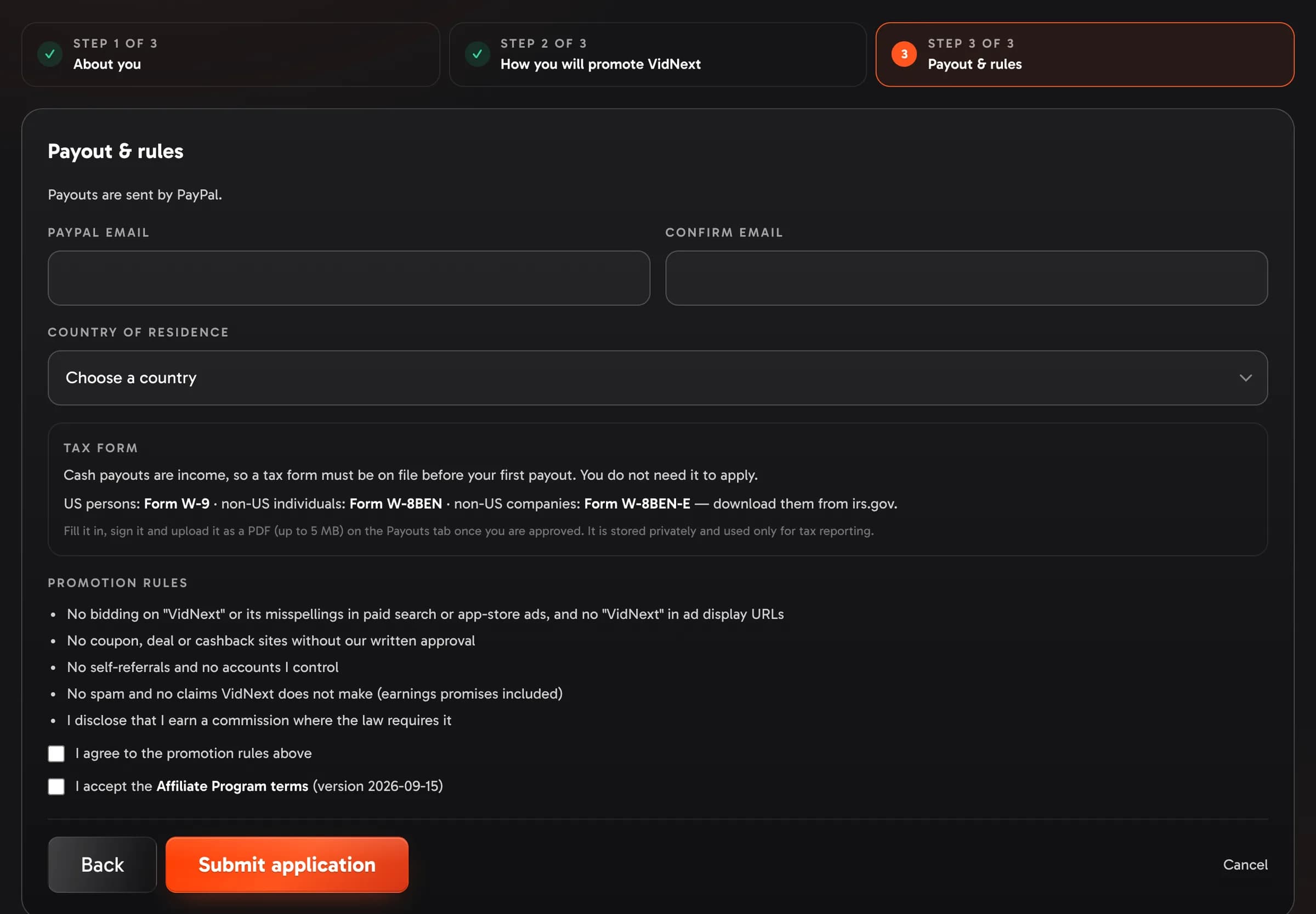
- Payout & rules Show me in the app ↗ — the payout method Show me in the app ↗ (only the methods on offer appear; when there is just one — PayPal for now — it is simply named), your payout email Show me in the app ↗ typed twice Show me in the app ↗, your country of residence Show me in the app ↗, the Tax form box Show me in the app ↗ that names the IRS form you will need (W-9 for US persons, W-8BEN for individuals outside the US, W-8BEN-E for companies outside the US, with a link to each), and two checkboxes: the promotion rules Show me in the app ↗ and the Affiliate Program terms Show me in the app ↗.
Continue Show me in the app ↗ checks each step before moving on; Back Show me in the app ↗ returns to the previous one and Cancel Show me in the app ↗ leaves without sending. Submit application Show me in the app ↗ on the last step sends everything at once; the Application received screen tells you what happens next and takes you back to your referral page Show me in the app ↗.
You do not need the tax form to apply: upload it on the Payouts tab once you are approved — it is needed before your first cash payout, and credits need no form at all.
The affiliate hub
Once approved, the Affiliate program page becomes your hub with five tabs: Overview, Links & codes, Earnings, Payouts and Program.
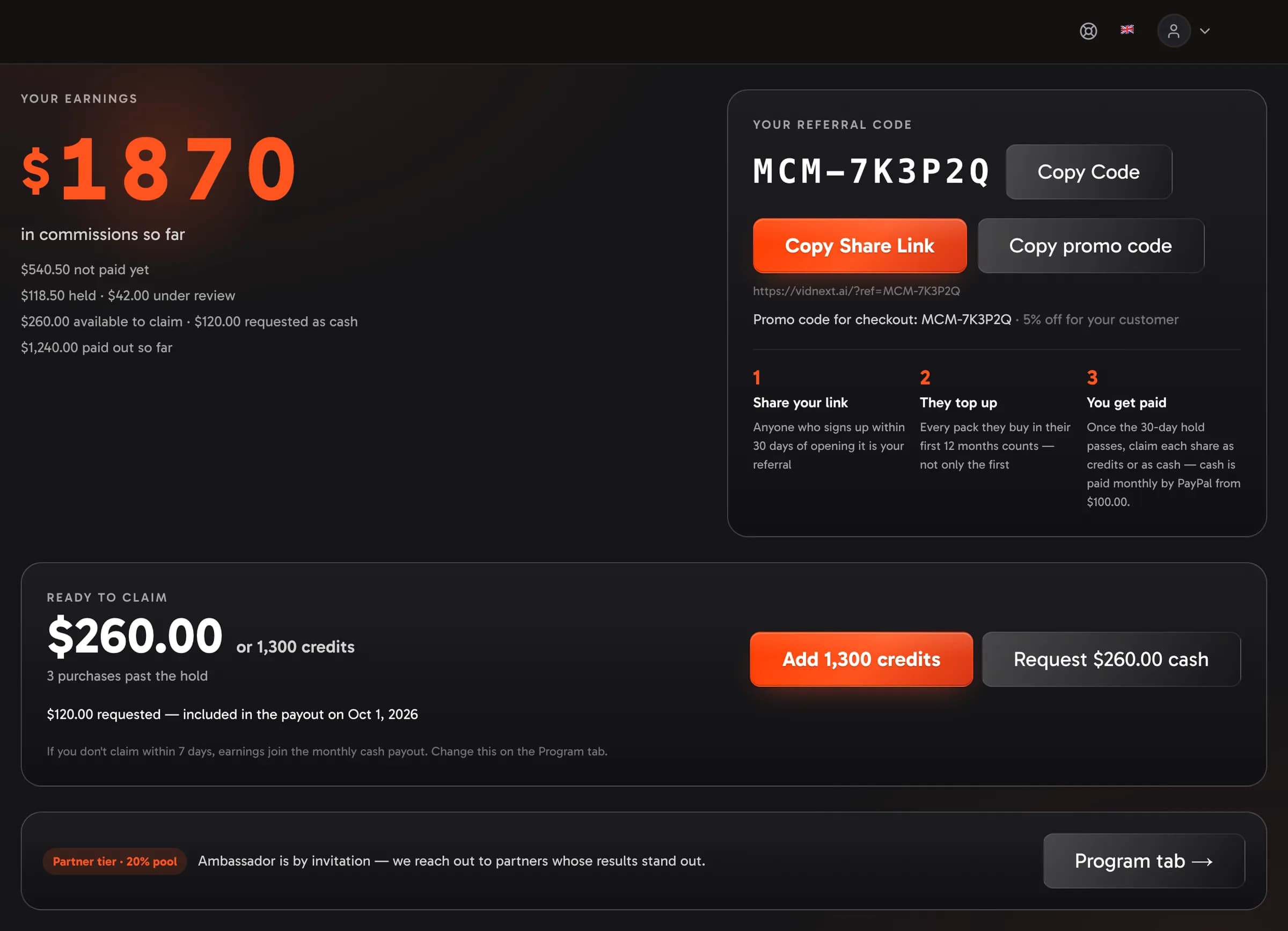
Overview starts with your earnings so far and your default link & code — copy the link Show me in the app ↗ and share it anywhere — then the things to act on:
- Ready to claim Show me in the app ↗ — see Credits or cash.
- Your tier and progress Show me in the app ↗ — the tier you are on, the bars to the next one and what is still missing on either axis (when the next tier is by invitation, the strip says so instead of showing bars); Program tab → Show me in the app ↗ opens the full ladder.
- Before your first cash payout Show me in the app ↗ — a short checklist that appears while your payout email Show me in the app ↗ or your tax form Show me in the app ↗ is missing; each row opens the Payouts tab. Credits need neither.
Then the numbers and the referrals table.
Credits or cash
- Credits — every referrer earns credits: each purchase's share lands on your credit balance by itself, 30 days after the purchase.
- Cash — for approved affiliates every purchase's share waits in the hub as money you claim: once it is past the hold, the Ready to claim card Show me in the app ↗ on the Overview tab shows the amount in dollars and in credits side by side, and you choose per claim — Add as credits Show me in the app ↗ puts the credits on your balance at once, Request cash Show me in the app ↗ puts the amount into the next monthly payout (US dollars through your payout method, from $100; credits have no minimum). The credits figure is what those purchases would have earned as credits, plus a 50% bonus for taking credits, so nothing is converted at a made-up rate. A claim takes everything available at once, and it cannot be turned into the other currency afterwards.
- If you never claim — the Unclaimed earnings setting on the Program tab decides. With Decide for me Show me in the app ↗ on, earnings you leave untouched for 7 days follow the currency you picked Show me in the app ↗ — credits land on your balance, cash joins the monthly payout. With Wait for my claim, nothing moves until you choose. Change it whenever you like; anything you already requested stays on its track. The Cash option Show me in the app ↗ and the Credits option Show me in the app ↗ sit side by side; Cash is greyed out for an account without an approved application.
Tiers and splits
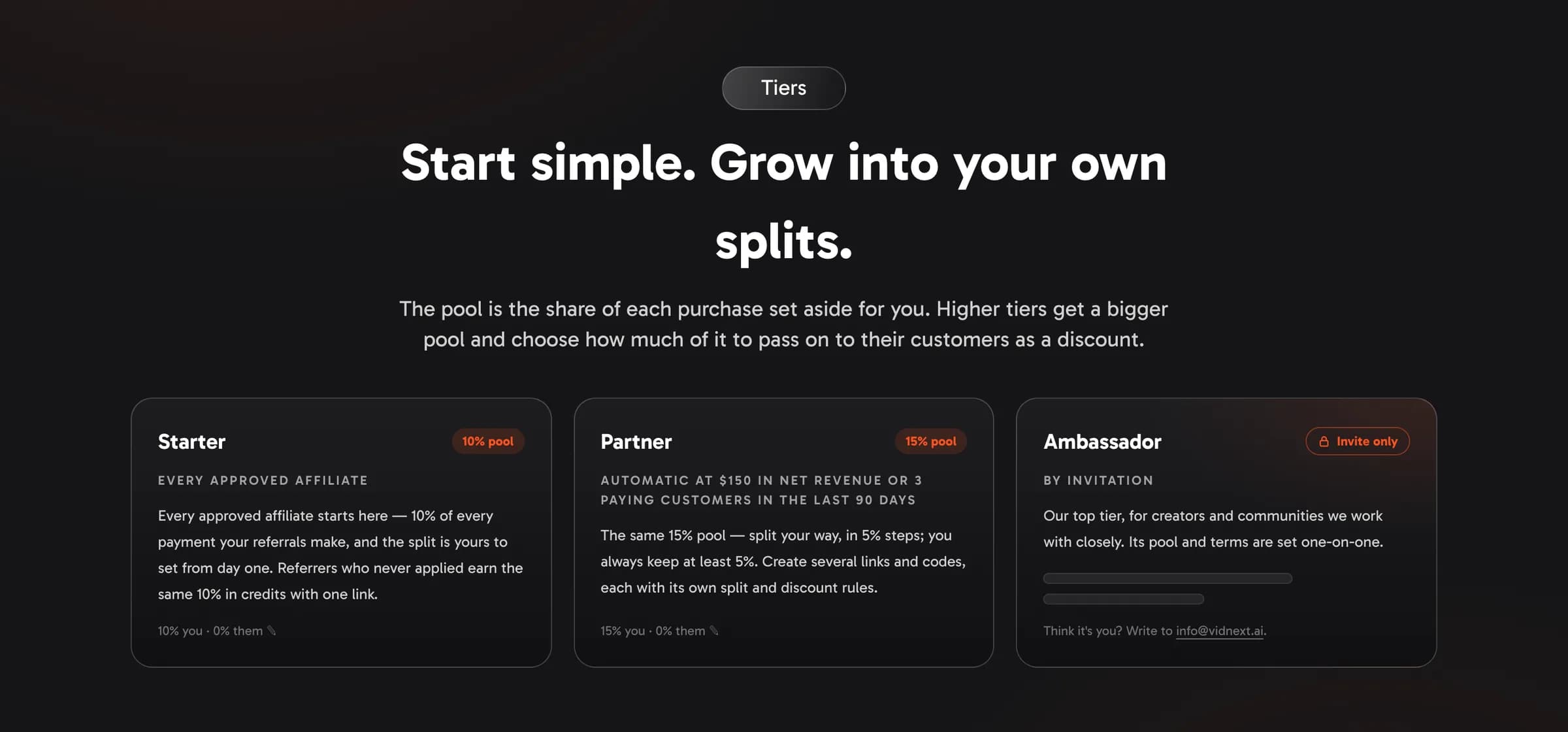
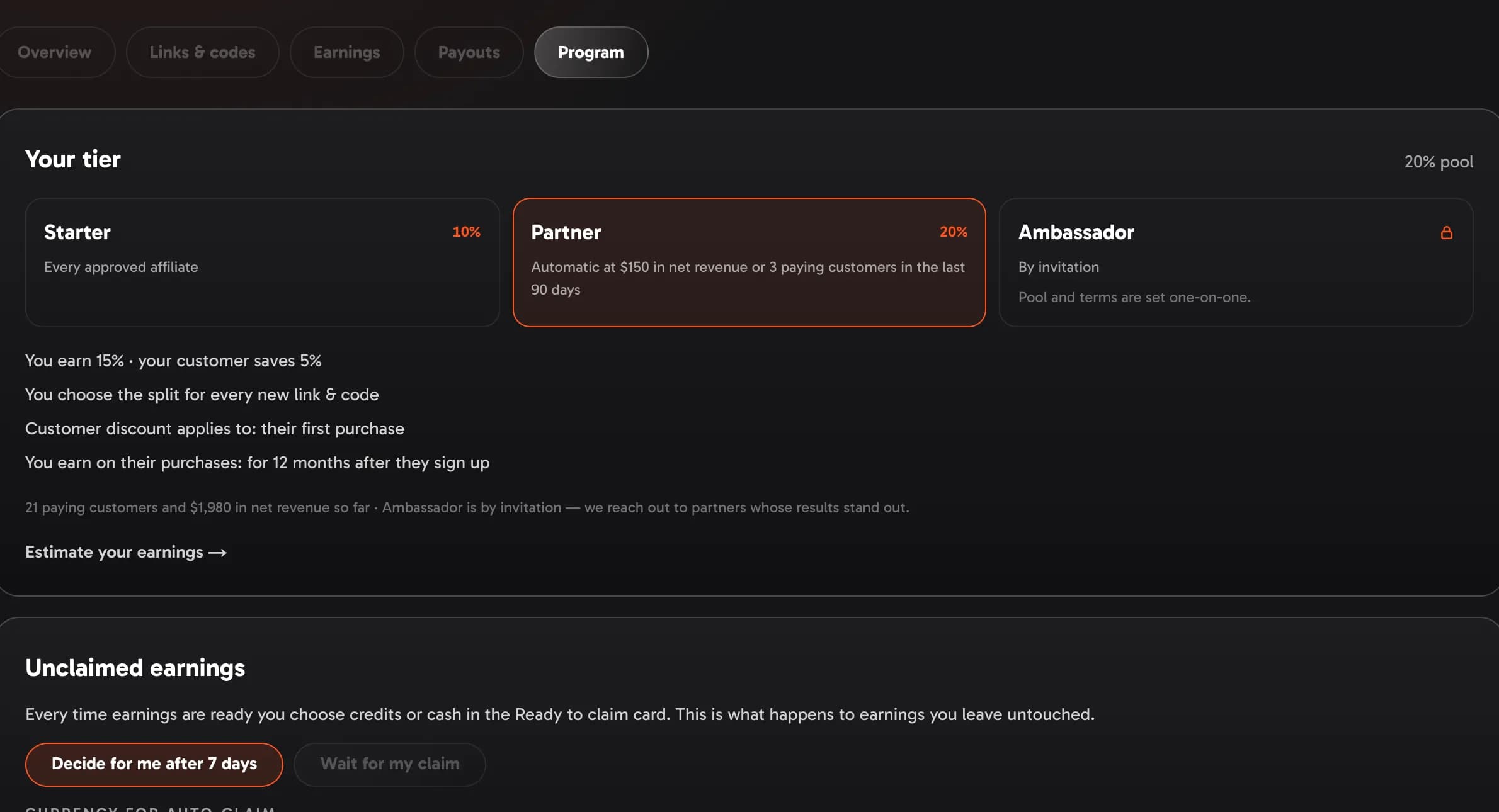
Tiers apply to approved affiliates. Every attributed purchase sets aside a pool that is split between you (commission) and your customer (discount):
| Tier | Pool | Split | Links & codes |
|---|---|---|---|
| Starter — every approved affiliate | 10% | your choice, in 5% steps: 10/0, 5/5 or 0/10 — the discount only reaches a customer's first monthly payment | up to 5 active links & codes at a time, each with its own split, custom code and short link (pause or archive one to add another) |
| Partner — $150 in net revenue or 3 new paying customers in your last 90 days | 15% | your choice: 15/0, 10/5, 5/10 or 0/15 | everything in Starter |
| Ambassador — the top tier: by invitation, unless its tier card says it unlocks automatically | larger — shared with invited partners | your choice | everything in Starter |
Partners and Ambassadors who reached their tier before these pools were set keep the pool they had; moving up a tier never lowers a pool.
Approval unlocks the whole toolkit; the tiers only raise the pool. Referrers who never applied stay at 10% in credits with one link and a fixed split, and never move up the tiers.
Tiers follow your last 90 days: the net revenue from what your referrals paid — plans, top-ups and packs, Enterprise excluded — and how many of them made their first purchase in that time. Either number is enough — $150 from two customers unlocks Partner just like three small customers do. Tiers are checked every night and approved affiliates move up to Partner automatically; if your last 90 days already clear the bar when your application is approved, you start on that tier right away. Ambassador is by invitation — its pool and terms are shared with the partners we invite, and the tier cards and the Program tab mark it By invitation with a padlock — unless its card says it unlocks automatically, in which case it works like Partner, with its own bar. The Program tab shows both numbers against the next bar Show me in the app ↗, and the Overview tab's tier strip keeps them in sight. Nobody is moved down automatically: if a quiet stretch leaves your last 90 days below your tier's bar, your tier stays and the VidNext team may get in touch.
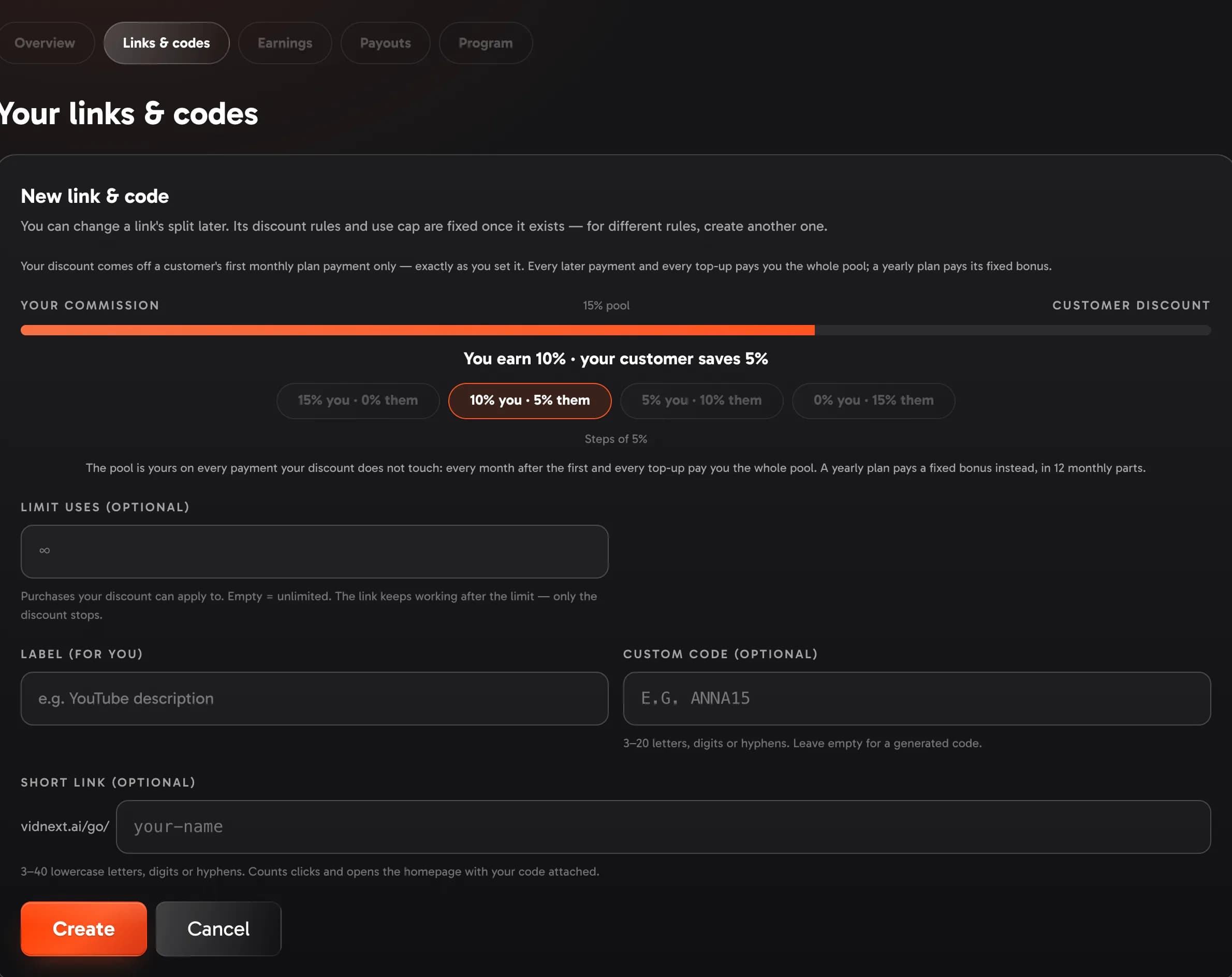
Use New link & code Show me in the app ↗ and pick the split Show me in the app ↗ — each link gets its own code. You can change a link's split any time with Edit split Show me in the app ↗: the new split counts for purchases from then on, and the link's promo code follows the new discount (a link that gains a discount gets a code with the same text; one that drops to 0% stops discounting). Earnings already booked keep the percent they were earned at.
The pool is yours. A discount only ever applies to a customer's first monthly plan payment, and your link's discount applies exactly as you set it. On that payment you earn the pool minus whichever discount set its price — your own code's in full; when another code or VidNext's first-time offer is bigger, the customer gets that one and it counts against your pool only up to 20% (VidNext covers the rest); every renewal and every upgrade charge after it pays you the whole pool, and so do top-ups, which carry no discount. When VidNext runs an upgrade offer (a discount for subscribers moving up a plan), your share of that upgrade and of the customer's discounted first month is counted on the usual price — that discount is ours. The same goes for a personal discount our team gives one of your customers: on every payment it touches, your share is counted on the usual price, with the whole pool — that discount is ours too. That is why a link may give the customer the entire pool (0% for you on their first month) and still pay you the full pool every month after. The new-link form states this rule Show me in the app ↗.
When you move up a tier, every active link keeps its customer discount and your commission grows by the pool difference. A Starter link at 10/0 becomes 15/0 the day you turn Partner; a Starter link at 5/5 becomes 10/5. Nothing your audience was promised changes on its own — re-split any link yourself whenever you like.
Links and codes
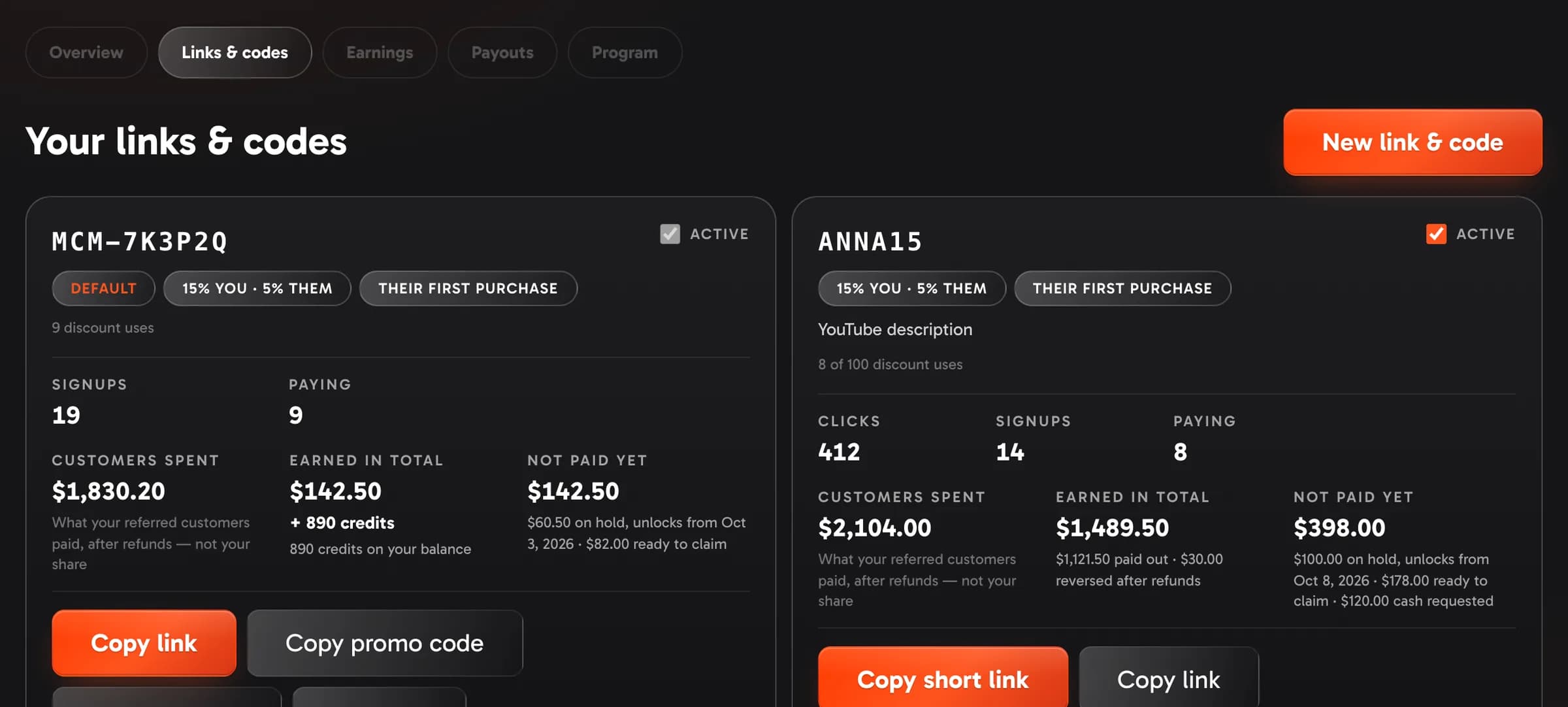
- The numbers on a card Show me in the app ↗ — Signups is how many people the link brought, Paying how many of them bought. Then three amounts. Customers spent is what those customers paid — every purchase, net of refunds — their spend, not your money. Earned in total is your share of it, all time; the line under it says what has already reached you (paid out, credits on your balance). Not paid yet is the part still on its way, and its line says where each piece stands: on hold (with the day the first amount unlocks), ready to claim, requested as cash, or credits pending. Dollars and credits sit side by side when you have both. A link that gives the whole pool to the customer on every purchase says it earns you nothing.
- Link — copy it and share it anywhere. It opens the VidNext homepage with your code attached, so people see the product before they sign up. Whoever opens it has 30 days to sign up on that device and still count as your referral; if they open several partners' links, the last one counts.
- Promo code — links that carry a discount also get a promo code with the same text. Someone who never opened your link can type it when they pay, get your customer discount, and become your referral from that purchase on. A link without a discount has no promo code, but its code still works on the pricing page: whoever types it becomes your referral (the page says the code carries no discount) — the same for every link without a discount.
- Short link — any affiliate link can also get a
vidnext.ai/go/your-nameaddress. Type the name when you create the link (or add one later); the hub tells you at once whether it is free. Names of platforms, campaigns and VidNext itself (youtube, instagram, promo, vidnext-…) are kept for VidNext's own links. It opens the homepage with your code attached, counts its clicks, and pauses together with the link. - Discount rules — a discount only comes off a customer's first monthly plan payment, exactly as you set it, so there is no rule to choose. You can cap how many customers get it; after the cap the link still refers people, and you earn the whole pool from them. Unlike the split, the cap is fixed once the link exists.
- Default link — the link shown on the Overview tab and the one you copy first. Set as default Show me in the app ↗ on any active link makes it the default. The default link is always live: to pause or archive it, make another link the default first.
- Archive Show me in the app ↗ — retires a link for good: the link, its code and its short link stop working and the card leaves the list. The referrals and earnings it brought stay yours. Pausing (the Active switch Show me in the app ↗) is the reversible option.
- Each customer is bound to exactly one partner — the first binding wins, and it does not move to another partner later.
How earnings work
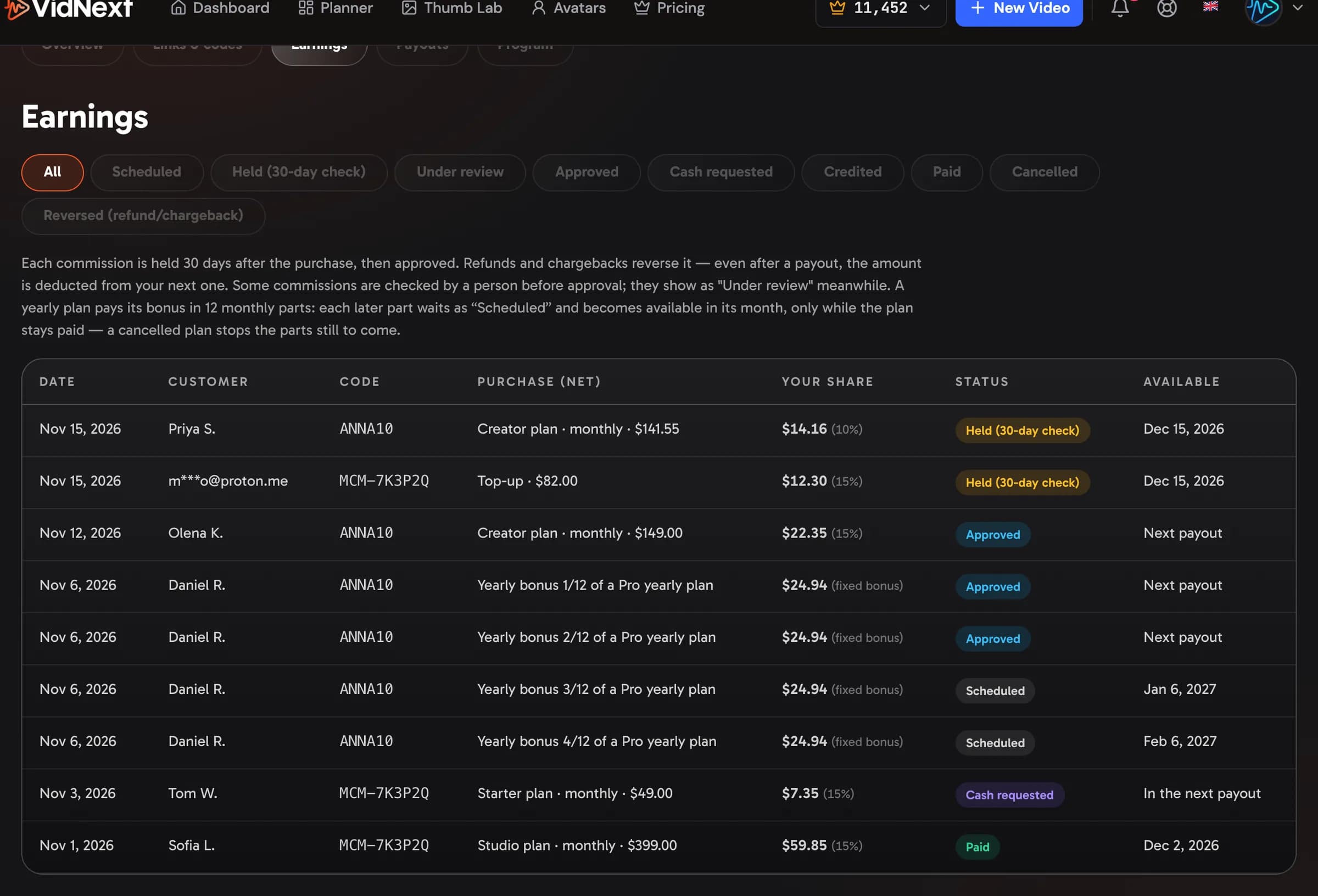
- A referral pays. Your reward is your commission share of what they actually paid (after any discount, before taxes — VidNext's own upgrade offers and personal discounts excepted: those are counted on the usual price) — for a plan payment, counted on at most $399, the price of Pro. Every plan payment and top-up they make within 12 months after they sign up counts, not only the first one. Referrals made before September 12, 2026 keep the earlier rule and earn for as long as the friend keeps buying. Yearly plans pay a fixed bonus instead of a share: half a month of the plan's monthly price for Starter, three quarters for Partner, and more for Ambassadors — counted on at most $399 — paid in 12 monthly parts. The first part follows the usual hold; each later part is released in its own month while the plan stays paid. If the customer cancels the plan, or the payment is refunded or charged back, the parts still to come stop. On the Earnings tab each part is its own row (yearly bonus 3/12), and the parts still to come show as Scheduled, dated with the month they are due; the Overview tab adds up what is still scheduled. Enterprise plans, their top-ups and custom Enterprise deals are not part of the program: purchases on them earn no reward.
- 30-day hold. Each reward shows as Held (credits: Pending) for 30 days after the purchase — that pause is the refund window and our fraud check. A refund or chargeback in that time reverses the reward.
- Available. After the hold, credits land on your balance. For approved affiliates the share becomes Available to claim instead — you decide whether it turns into credits now or into a cash request. Some commissions show Under review — a person is checking them before they become available; nothing is lost, it just takes a little longer.
- Paid. Requested cash is paid once a month. Anything reversed after a payout (a late refund) is deducted from your next one — the deduction shows on the Earnings tab as a negative line; a refund on a purchase you took as credits takes those credits back.
The Earnings tab Show me in the app ↗ lists every reward with its status and, for cash, the purchase it came from. Each card on the Links & codes tab shows the same amounts for that link alone, next to what its customers spent.
Payouts
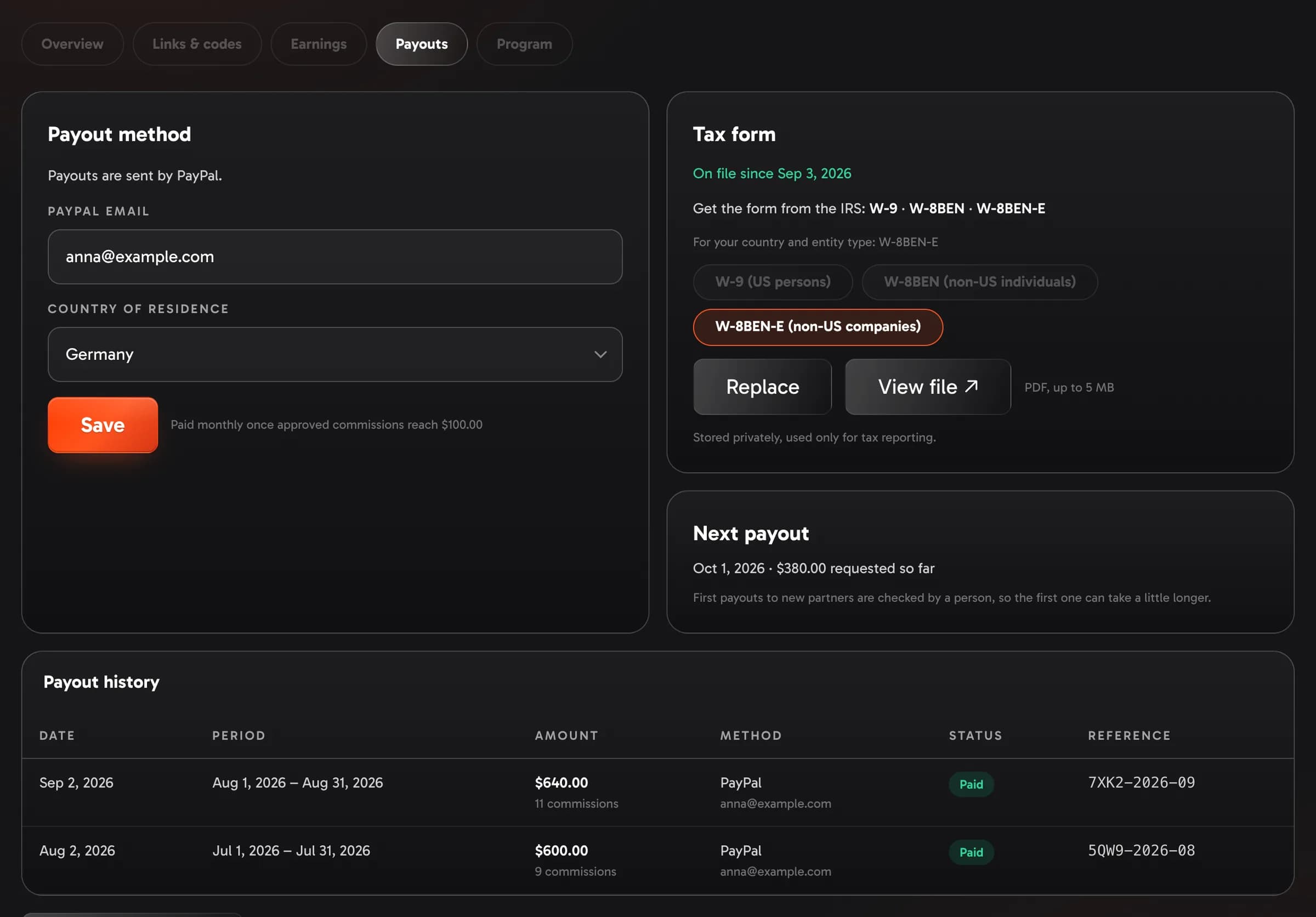
- Method — choose how you are paid at the top of the Payouts tab Show me in the app ↗: only the methods on offer appear (PayPal for now — with a single method it is simply named). Enter the email of that account Show me in the app ↗ and your country, then save.
- A paused method — if the method you saved is switched off, the Payouts tab says so Show me in the app ↗ and asks you to choose another, and we tell you once by email. Nothing you earned is lost: cash you requested waits and goes out with the first payout after you save a method that is on offer.
- Bank transfer through Stripe — when the Payouts tab offers it and Stripe pays your country, choose it, enter your email and country and click Set up with Stripe Show me in the app ↗. Stripe's own secure page asks for your bank details and checks your ID — we never see them — and then sends you back. The Stripe box Show me in the app ↗ shows where you stand: Stripe is checking your details, Stripe needs a little more information (click Continue with Stripe) or Ready. Payouts arrive in your bank's currency; the transfer fees are on us. After you change the bank account at Stripe, your next payout is checked by a person first, and if a bank ever sends a payout back we tell you and the amount goes out again with the next payout.
- Minimum — payouts go out monthly once the cash you requested reaches $100; smaller amounts roll over to the next run. Credits have no minimum — anything available can always be claimed as credits.
- Tax form — before your first payout, upload a W-9 (US persons), a W-8BEN (non-US individuals) or a W-8BEN-E (non-US companies) as a PDF Show me in the app ↗. The card links to each form on irs.gov and suggests the right one from your country and whether you applied as an individual or a company. Credits need no form.
- First payout — a person checks it before it goes out, so the first one can take a little longer than the monthly cycle.
- Payouts on hold — if the page shows a hold, the reason is right there; commissions keep accruing and we email you when it is lifted.
The Overview tab's checklist keeps the two setup steps — payout details and tax form — in sight until both are done. A partner whose tier was raised by hand before applying sees a card here Show me in the app ↗ with Apply now Show me in the app ↗: cash starts with an approved application.
Rules
Keep it honest and it is simple: no self-referrals or accounts you control, no coupon or deal sites without written approval, no bidding on "VidNext" keywords, no cookie stuffing, no spam, no claims we do not make (earnings promises included), and say that you earn a commission wherever the law or the platform requires it. Keep your application accurate — tell us before you add paid ads or coupon and deal sites to the channels you listed. Breaking the rules reverses the rewards and can end your participation. The full text is in the Terms of Service, section 11.