DocsBilling & FAQ
Pricing & plans
Prices, plans, discounts, payment methods and refunds.
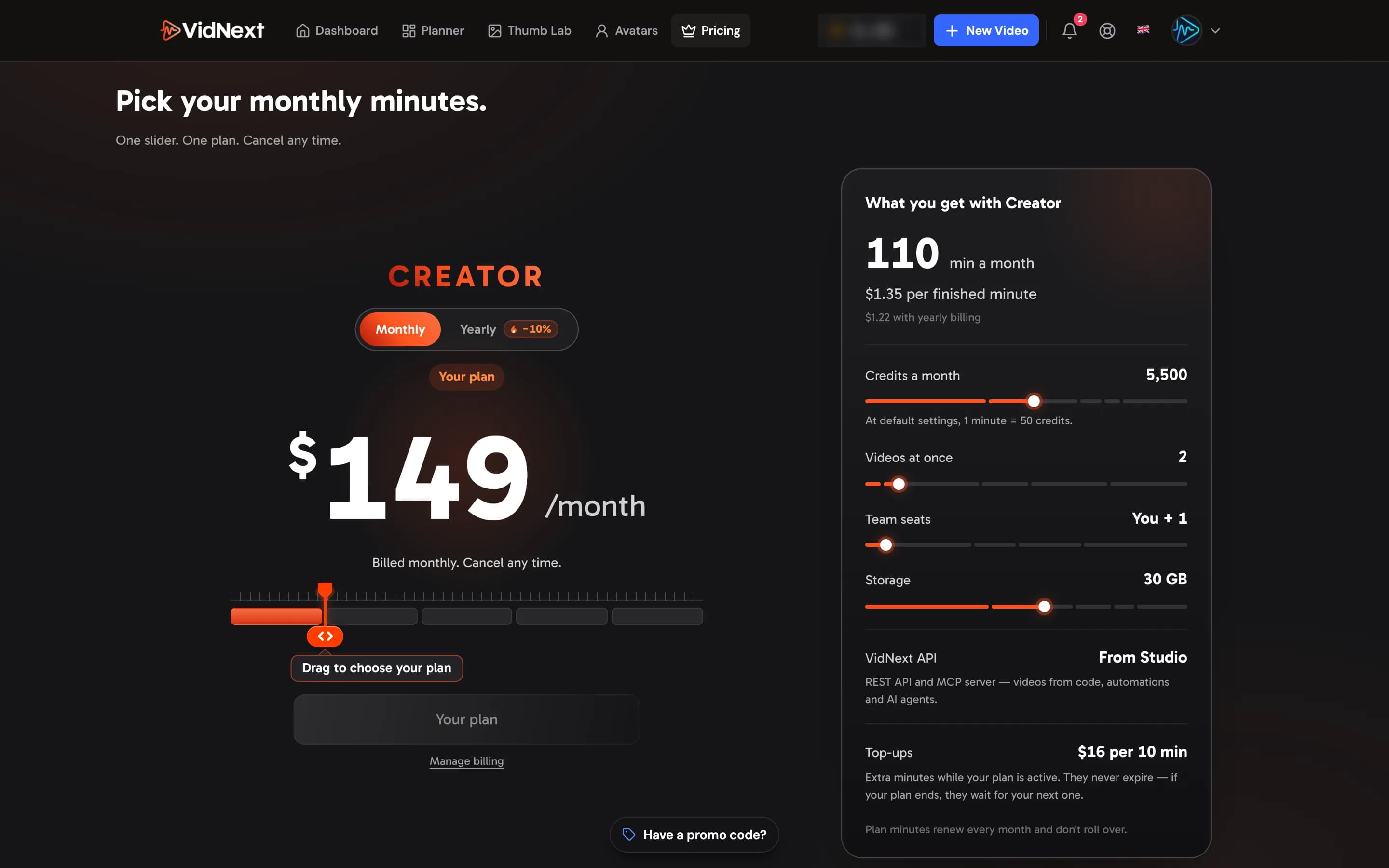
VidNext is sold as monthly plans. Every plan includes minutes of finished video each month, and one minute at default settings is 50 credits — so a plan's credits are its minutes × 50. The prices on the pricing page are the ones that apply; they are:
| Plan | Per month | Yearly (one payment) | Minutes a month | Credits a month | Price per minute |
|---|---|---|---|---|---|
| Starter | $49 | $528 | 30 | 1,500 | $1.63 |
| Creator | $149 | $1,608 | 110 | 5,500 | $1.35 |
| Pro | $399 | $4,308 | 350 | 17,500 | $1.14 |
| Business | $699 | $7,548 | 650 | 32,500 | $1.08 |
| Studio | $999 | $10,788 | 1,000 | 50,000 | $1.00 |
| Enterprise | $4,999 | $59,988 | 6,250 | 312,500 | $0.80 |
Each plan also sets how many videos you can make at the same time, your team seats and your storage — the pricing page lists them for every plan.
Studio and Enterprise also include the VidNext API: make videos from your own code, automations or AI agent. On another plan, support can turn it on for your account.
How plan minutes work
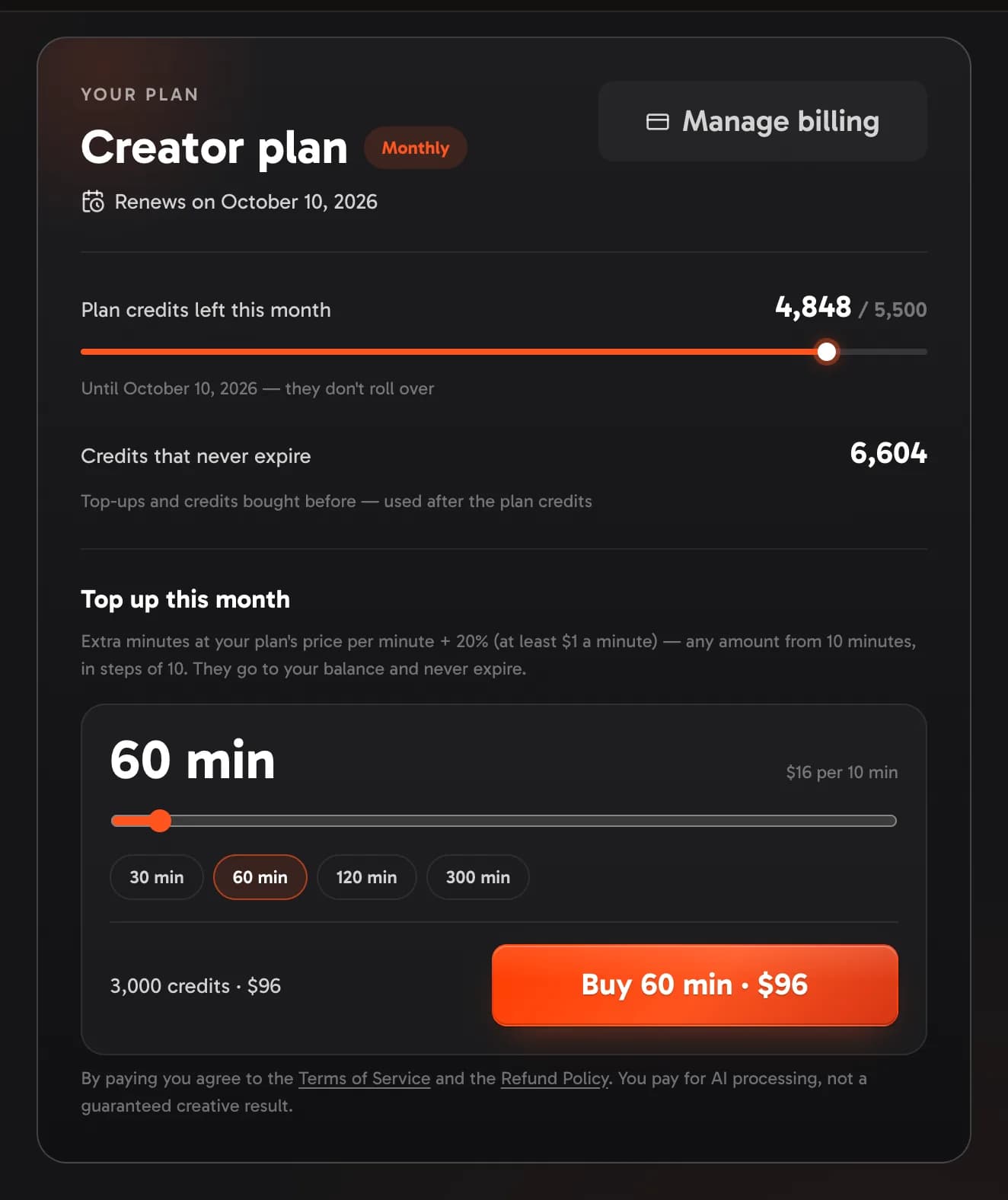
- Fresh minutes every month. Your plan's credits arrive at the start of each billing month, and they are used before any other credits on your balance.
- No rollover. Plan minutes you don't use end with the month; the next month starts with a fresh allowance.
- Credits that never expire — top-ups, and credits you bought before plans launched — are used after the plan's credits and stay on your balance for good.
- The Credits page shows your plan Show me in the app ↗: the plan and its billing period, when it renews, the plan credits left this month and the credits that never expire.
What a video costs in credits is on How credits work.
Monthly or yearly
Pay month by month, or pay for a year at once and save 10% on every plan except Enterprise (in whole dollars: a month on the yearly plan is the monthly price minus 10%, rounded — $44 on Starter, $899 on Studio) — the Yearly switch Show me in the app ↗ at the top of the pricing page shows both prices. Enterprise has no yearly discount: its yearly billing is 12 months at the monthly price, one payment. A yearly plan is one payment, and its minutes still arrive month by month: each month's minutes are for that month. The one discount that also applies to yearly billing is a personal discount from our team.
Choosing a plan
On the pricing page, drag the slider Show me in the app ↗ to a plan — the price changes as you drag, and the card beside it Show me in the app ↗ shows what the plan gives: its minutes a month, the price per finished minute (under a first-month discount, the first month's price per minute, with the regular one under it), its credits a month, videos at once, team seats, storage and the top-up price — and press the button under the slider Show me in the app ↗. Checkout runs on Stripe, where you tick the box to agree to the Terms of Service and the Refund Policy — the line under the button Show me in the app ↗ says the same: you pay for AI processing, not a guaranteed creative result. Once you have paid you are back on the Credits page, where the plan and its minutes appear within a few seconds.
First-month discount. The first monthly payment of your first plan can come with a discount — a first-purchase offer when one is running, or a promo code from a partner or one of our campaigns — and you get exactly the percent it states. Credit packs you bought before plans don't count: your first plan still gets the offer. The discounted first month is in whole dollars, rounded down in your favor — 30% off $399 is $279. It never applies to yearly billing or to Enterprise, and discounts never stack: you get the biggest one. When you are signed in, the pricing page shows your discount above the plans and the price of your first month on each card.
Plan promotions. From time to time one plan runs its own promotion — a discount on that plan's first monthly payment for anyone who hasn't had a plan yet (credit packs bought before don't count); from the second month the plan costs its usual price. Yearly billing doesn't take a promotion: it keeps its usual 10% off. The pricing page marks every plan on promotion on the slider — −30% above its stop; press it to jump there — and on that plan shows the discount beside the plan's name Show me in the app ↗ with its last day, the struck price and your first month's price. A promotion never stacks with another discount — you get the biggest one.
Personal discounts. Our team can also give your account a discount of its own — a percent off your first plan payment, your next plan payment, or every payment. A personal discount works on every plan, monthly or yearly, Enterprise included, and one on every payment covers your top-ups too. Prices under it are whole dollars, rounded down in your favor: 30% off Creator is $104 a month, and on yearly billing each month of the year is rounded down — 30% off Pro yearly is $3,012 instead of $4,308. When you are signed in, the pricing page shows your price on each plan with the discount's terms under it, and the plan card on the Credits page shows the discount too — on a plan, as the price of your next payment. It never stacks with another discount: each payment takes the biggest one, and a next-payment discount that a bigger one beat waits for the payment after. A next-payment discount is used by that one payment — a renewal, or the charge for moving up a plan; one on every payment follows you when you change plans and stays until our team ends it or its last day passes, if it has one. A first-payment discount is for an account that hasn't paid for a plan yet.
Trying VidNext with a promo code
Some promo codes — shared by partners or in our campaigns — add credits and, for an account that needs a plan, a few days to create without one. Enter the code under Have a promo code? Show me in the app ↗ on your Billing page; how the trial works is on How credits work. Credits our team adds to your account can come with the same kind of trial (Credits from the VidNext team). When the trial ends, choose a plan to keep creating — the credits left on your account work again with it.
Top-ups
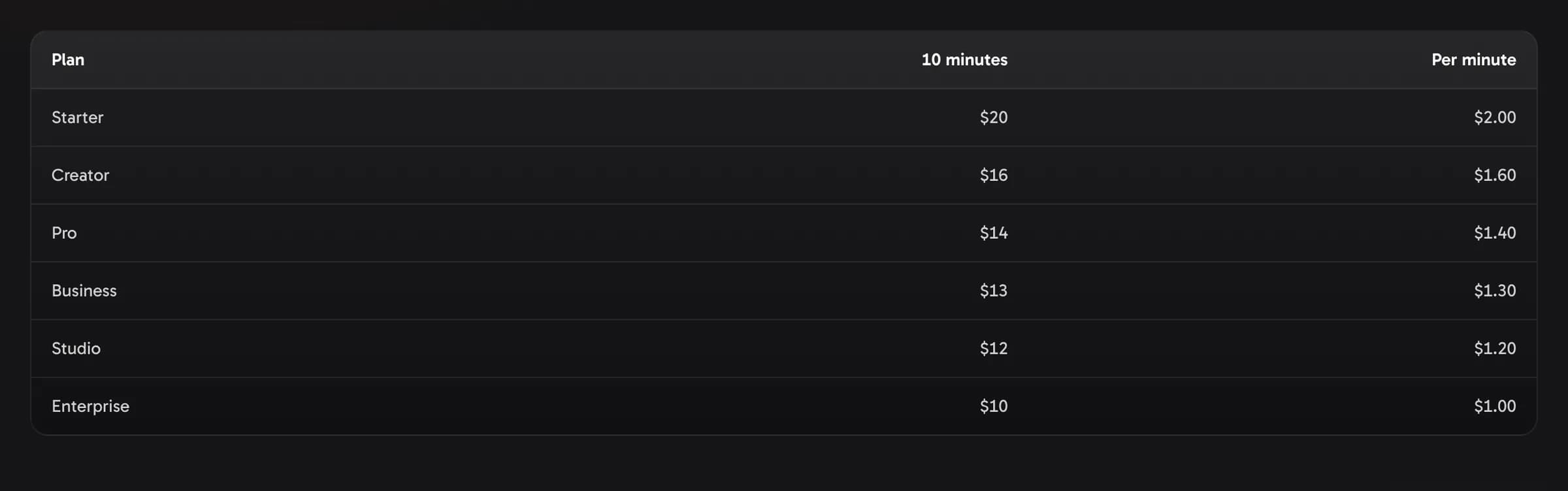
Used up a month's minutes? With an active plan you can top up any number of minutes — from 10, in steps of 10, up to 1,000 at a time — from the plan card on the Credits page Show me in the app ↗: move the Top up this month slider or pick 30, 60, 120 or 300 minutes, check the credits and the price, and Buy opens the checkout. A top-up costs your plan's price per minute plus 20% (never less than $1 a minute), priced per 10 minutes in whole dollars, and its credits never expire. Top-ups are sold only with an active plan, at your own plan's prices — less your personal discount if our team gave you one on every payment (the slider shows the discounted total, in whole dollars) — and you buy them on the Credits page; the pricing page lists them for every plan. You use top-up minutes while your plan is active: if the plan ends, they stay on your balance and work again with your next plan (accounts from before plans can use them without one — see below).
Changing or cancelling your plan
Manage billing on the Credits page Show me in the app ↗ — or on the pricing page, under the button when the slider is on your plan Show me in the app ↗ — opens the billing portal:
- Move up any time: you pay the difference for the rest of your billing period, and the bigger plan's extra minutes for the rest of this month arrive right away.
- Move down, or go from yearly to monthly billing: the change starts at your next renewal.
- Go from monthly to yearly: your year starts right away, and the unused part of the month is credited to that payment.
- Cancel: the plan stays active until the end of the period you paid for and doesn't renew. Credits that never expire stay on your balance.
- Update your card and download your invoices in the same place.
Changed your mind after cancelling? Until the plan ends, its card on the Credits page shows the date it ends and Renew plan Show me in the app ↗ — the plan then keeps renewing as before, and nothing is charged until its renewal date.
Upgrade offers. From time to time we offer subscribers a discount for moving up to a bigger plan — for example 30% off Business for people on Pro. When one is open to you, your plan card on the Credits page shows it with Upgrade with 30% off Show me in the app ↗, and on the pricing page the offer's plan is marked on the slider and shows the offer price with the same button Show me in the app ↗. It covers the rest of your current billing month and your first full month on the bigger plan: today you pay for the rest of the month at the offer price, minus the unused part of your current plan (Stripe shows the exact amount before you confirm), and your first full month is at the offer price too, in whole dollars — $489 instead of $699 at 30% off Business. After that the plan costs its usual price. Your minutes don't change: this month's extra minutes arrive right away, and every month brings the plan's full minutes. An upgrade offer is for monthly plans, once per account for each plan, and doesn't combine with another discount on your plan — a personal discount included (one on your next or every payment already takes its percent off moving up). If your plan is set to end, renew it first; if a plan change is already scheduled, undo it in Manage billing first. Moving up through Manage billing is always at the usual price.
The credits menu in the top bar has the same shortcuts: Top up (to the plan card's top-ups) and Manage subscription (the billing portal).
Once a plan has ended, its card on the Credits page says so and offers Choose a plan — a new plan starts with a new checkout (the billing portal can't restart an ended plan). If a payment on the old plan is still open, settle it in Manage billing first.
If a payment fails
We'll try your card again and let you know: a notice at the top of the app and an email say the payment didn't go through, and the plan card on the Credits page asks you to Update card (it opens the billing portal). Until the payment goes through, the new month's minutes don't arrive — and if your account was created after plans launched, new videos, thumbnails and avatars wait too. Videos you already made stay available: watch, edit, download and export.
Accounts from before plans
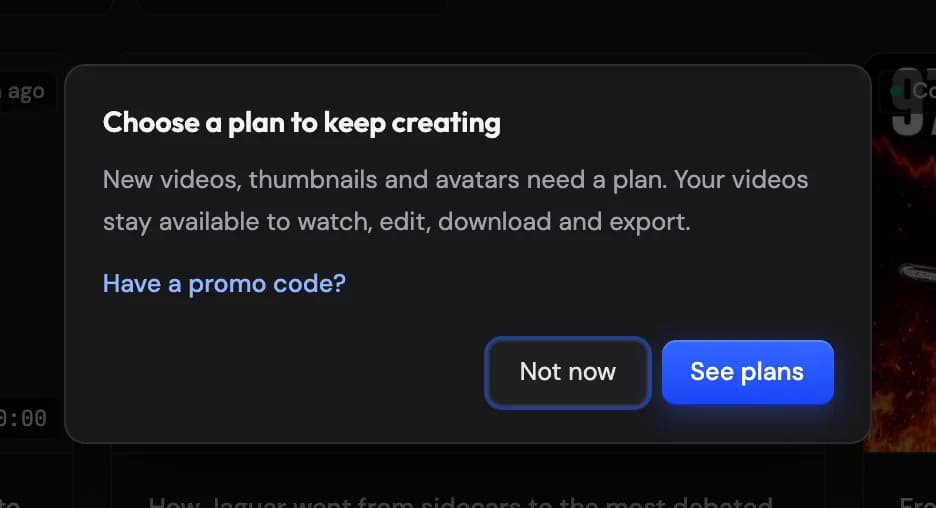
If your account existed before plans launched, you keep creating with your balance whether or not you choose a plan, the credits you bought never expire, and your 50 GB of storage stays (a plan with more storage raises it). A plan adds monthly minutes at a lower price per minute. Accounts created after the launch need an active plan to start new work — videos, thumbnails (Thumb Lab and AI edits included), avatars and their previews, and Idea Studio runs; watching, editing, downloading and exporting never need one. Without a plan, a notice at the top of the app offers See plans and Have a promo code? Show me in the app ↗, and so does the window that opens when you start new work Show me in the app ↗ — a promo code that adds credits can start a trial (Trying VidNext with a promo code).
Payment methods
All payments are processed in USD via Stripe (cards). Sales are handled by Promodo Inc. (USA) — the charge appears on your statement as PROMODO*VIDNEXT. Sales tax or VAT is added at checkout where it applies, and the checkout shows the total before you pay.
Teams
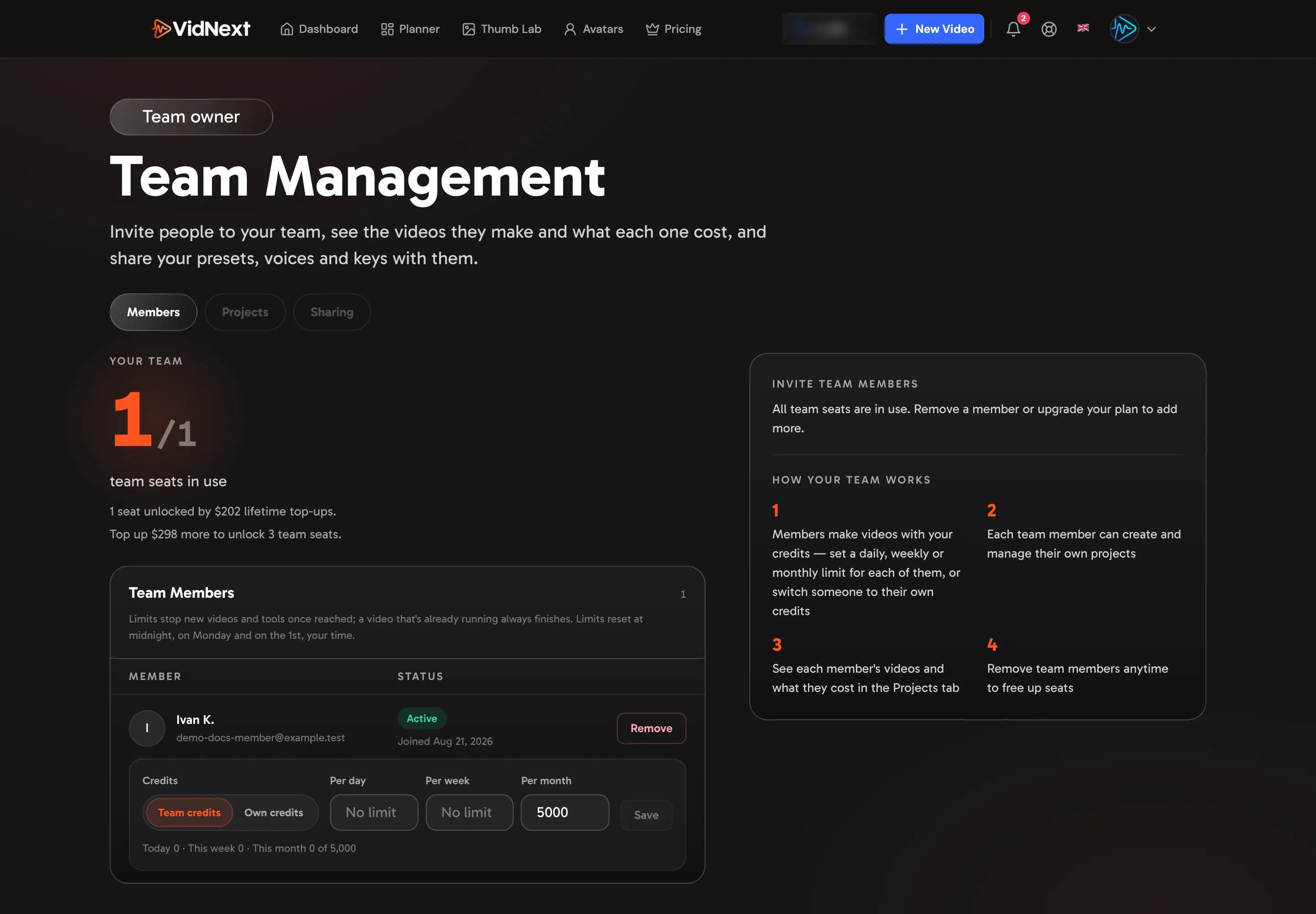
Your plan comes with team seats (the pricing page lists them for every plan) — and if your earlier top-ups already unlocked more seats, you keep the larger number — invite teammates Show me in the app ↗ who make videos with your credits, with no separate billing. For each member you can set daily, weekly or monthly limits on your credits, or switch them to their own credits. The Team page shows your seat allowance and what each member makes and what it costs, and lets you share presets, voices, API keys, music and avatars with them. See Teams.
Refunds
The short version: you're paying for AI production compute, so successfully completed work is non-refundable — but verified technical failures are refunded as credits, and billing errors are always corrected. Cancelling a plan stops the next renewal. If the plan's latest payment is refunded in full, the plan ends right away and the credits that payment added are taken back, unused plan credits first. The rules for plan payments and top-ups are in the refund policy. Before requesting a refund for a creative issue, try the editor — swapping clips or regenerating narration then re-rendering costs a small fraction of the video's price.
If we limit or suspend an account for breaking the Terms, its plan stops renewing and it can't buy anything until the restriction is lifted — see Restricted and suspended accounts.
The full policy lives at vidnext.ai/refund. For anything billing-related, use Contact support on the credits page (it opens a conversation with the billing category set — see Help & Support) or email support@vidnext.ai.